Inside Git: How It Works and the Role of the .git Folder
“From the .git directory to commits: how Git stores and tracks your code”

Introduction
Many people use Git every day, but treat it like a magic box:
git addgit commitDone ✅
But Git is not magic.
Internally, it works in a very logical and simple way.
Once you understand this, Git becomes easy and predictable.
What Is the .git Folder?
When you run:
git init
Git creates a hidden folder called .git.
The
.gitfolder is the heart and brain of Git.
Why it exists
Stores entire history
Stores commits, branches, and files
Tracks everything Git knows about your project
If you delete .git → your project is no longer a Git repository.
Structure of the .git Directory
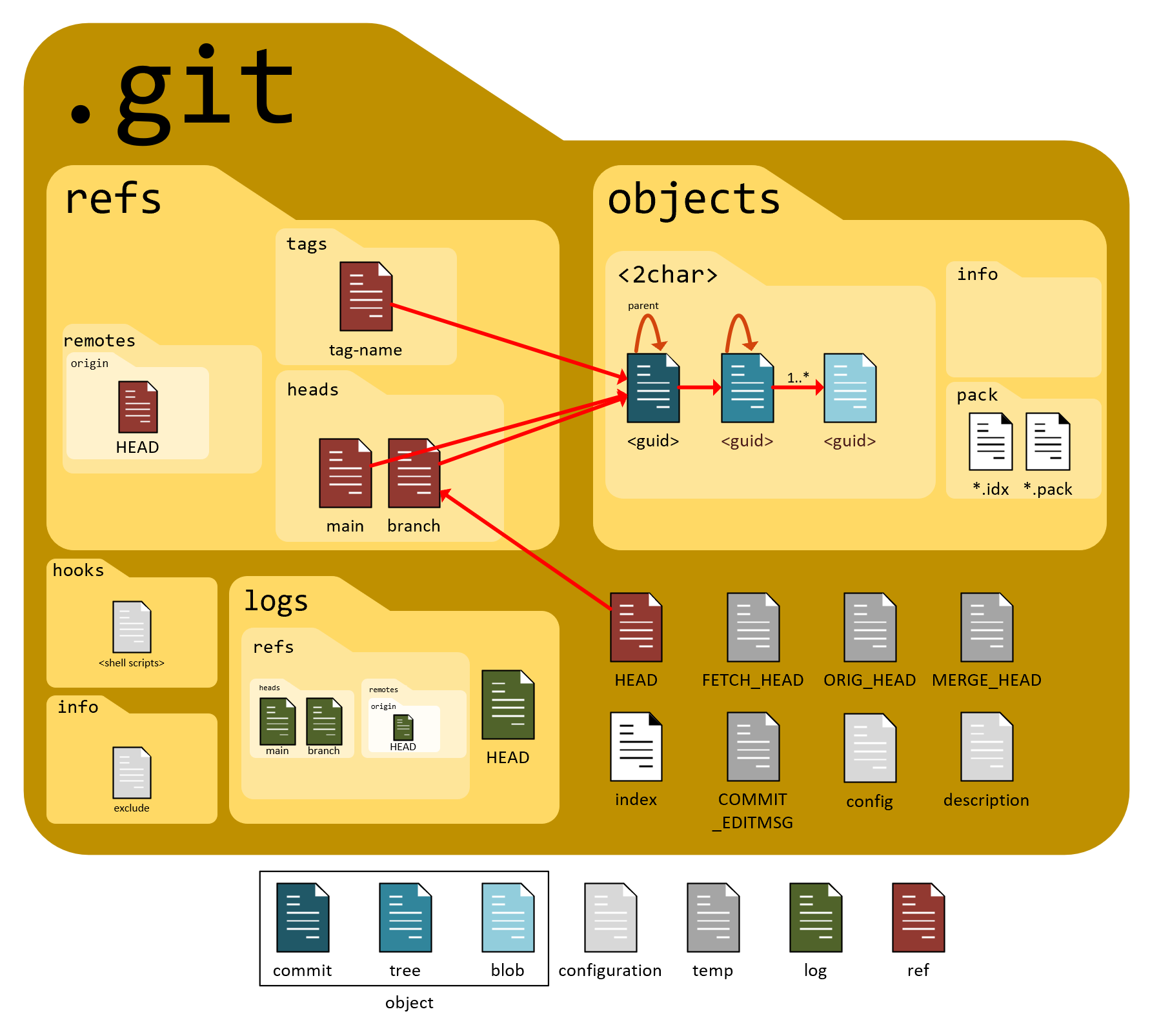
Inside .git, important parts are:
objects/→ actual data (files, commits)refs/→ branches and pointersHEAD→ current branch/commitindex→ staging area info
You normally never edit these manually.
Git Objects (Core Concept)
Git stores data using objects.
There are 3 main Git objects.
1️⃣ Blob (File Content)
A blob stores:
The content of a file
Not the filename
Not the folder
If two files have the same content, Git stores only one blob.
2️⃣ Tree (Folder Structure)
A tree represents:
A directory
Links filenames → blobs
Links subfolders → other trees
👉 Think of tree as:
“This folder contains these files and subfolders”
3️⃣ Commit (Snapshot)
A commit stores:
A reference to a tree
Author info
Commit message
Parent commit
👉 A commit = snapshot of the entire project
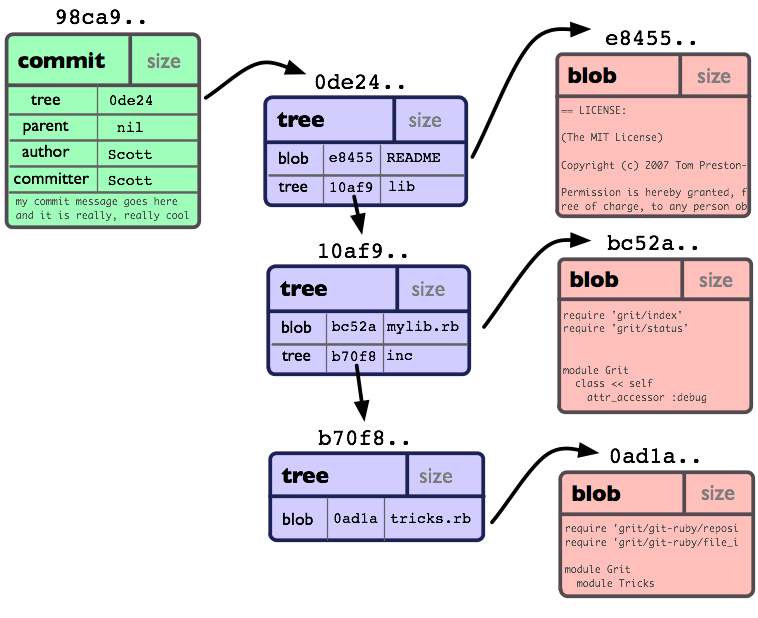
Relationship Between Commit, Tree, and Blob


Simple chain:
Commit
  ↓
Tree (folders)
  ↓
Blob (file contents)
How Git Tracks Changes
Git does not track file changes line-by-line like Word.
Instead:
It stores snapshots
Each snapshot points to trees and blobs
Unchanged files are reused, not copied
This makes Git fast and efficient.
What Happens During git add
When you run:
git add file.txt
Internally:
Git reads file content
Creates a blob
Saves blob in
.git/objectsUpdates the index (staging area)
👉 git add = prepare snapshot
What Happens During git commit


When you run:
git commit -m "message"
Internally:
Git creates a tree from staging area
Git creates a commit object
Commit points to:
Tree
Parent commit
HEADmoves to new commit
👉 git commit = save snapshot permanently
How Git Uses Hashes
Git uses SHA-1 hashes.
Each object gets:
A unique hash
Based on its content
Why hashes matter
If content changes → hash changes
If data is corrupted → hash mismatch
Guarantees integrity and safety
👉 Git is trust-based on math, not hope.
Mental Model of Git (Most Important)
Instead of commands, remember this:
Git stores objects
Objects are connected
Commits point to trees
Trees point to blobs
Hashes guarantee correctness
Once you understand this, commands make sense naturally.
Internal Flow Summary


Edit file
↓
git add → blob stored
↓
git commit → tree + commit created
↓
HEAD updated
Why This Matters
Understanding Git internally helps you:
Debug problems
Understand branches
Resolve conflicts
Stop fearing Git
Conclusion
Git is not complicated.
It is structured, mathematical, and predictable.
Learn the model once, and Git becomes simple forever.
One-line summary
Git works by storing snapshots using blobs, trees, and commits inside the .git folder, ensuring integrity through cryptographic hashes.


