Understanding HTML Tags and Elements
A beginner-friendly guide to understanding HTML tags, elements, and how web pages are structured

HTML Explained Simply: Tags, Elements, and How Web Pages Are Built
HTML Is the Skeleton of a Webpage
A human body needs bones to hold shape.
A webpage needs HTML to hold structure.
HTML (HyperText Markup Language) is used to:
Structure content
Define headings, paragraphs, images, links
Tell the browser what things are (not how they look)
👉 HTML does not style or animate — it only gives structure.
What Is an HTML Tag?
An HTML tag is like a label or container marker.
Think of it like a box 📦:
The tag tells what kind of content is inside
The browser reads the tag and understands its purpose
Example:
<p>Hello World</p>
Here:
<p>→ opening tag</p>→ closing tag
Opening Tag, Closing Tag, and Content
Let’s break it clearly 👇
<p>This is a paragraph</p>
Opening tag →
<p>Content →
This is a paragraphClosing tag →
</p>
Together, they form one complete unit.
What Is an HTML Element?
This is a very common beginner confusion.
Tag vs Element


HTML tag → just the marker (
<p>)HTML element → opening tag + content + closing tag
So:
<p>Hello</p>
✔ <p> → tag
✔ <p>Hello</p> → element
Self-Closing (Void) Elements
Some elements do not wrap content.
They:
Have no closing tag
Just do one job
Examples:
<img src="image.jpg">
<br>
<hr>
<input>
These are called:
Self-closing elements
Void elements
Think of them as single-action buttons 🔘.
Block-Level vs Inline Elements
Block-Level Elements
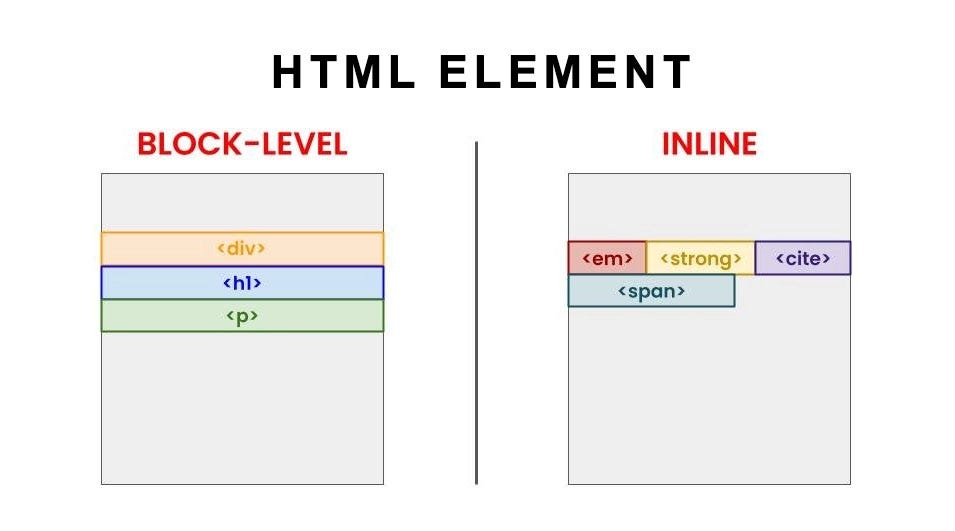

Block elements:
Start on a new line
Take full width
Examples:
<h1>
<p>
<div>
Visual idea:
[ Block Element ]
[ Block Element ]
Inline Elements
Inline elements:
Stay within the same line
Take only required space
Examples:
<span>
<a>
<strong>
Visual idea:
Text [inline] more text [inline]
Commonly Used HTML Tags (Beginner Set)
| Tag | Purpose |
<h1> | Main heading |
<p> | Paragraph |
<div> | Generic block container |
<span> | Generic inline container |
<a> | Link |
<img> | Image |
<ul> / <li> | Lists |
👉 You don’t need more than these to start.
Simple Example Putting It Together
<h1>My Website</h1>

<p>This is a paragraph with a <span>highlighted word</span>.</p>

<img src="photo.jpg">
What the browser understands:
Heading
Paragraph
Inline text
Image
Inspect HTML in Your Browser (Important 🔍)
Right-click any webpage → Inspect.
You’ll see:
HTML structure
Nested elements
Real-world usage
This is how developers actually learn HTML.
One-Line Mental Model
HTML = structure
Tags = labels
Elements = complete building blocks


