Emmet for HTML: A Beginner’s Guide to Writing Faster Markup
A beginner-friendly guide to using Emmet shortcuts to write HTML faster and with less typing

“Why does writing HTML feel so slow?”
If you’re a beginner, HTML often feels like this:
<div>
  <h1></h1>
  <p></p>
</div>
You type:
Opening tags
Closing tags
Indentation
Repetition
It works… but it’s slow and boring.
This is exactly the problem Emmet solves.
What Is Emmet? (Very Simple)
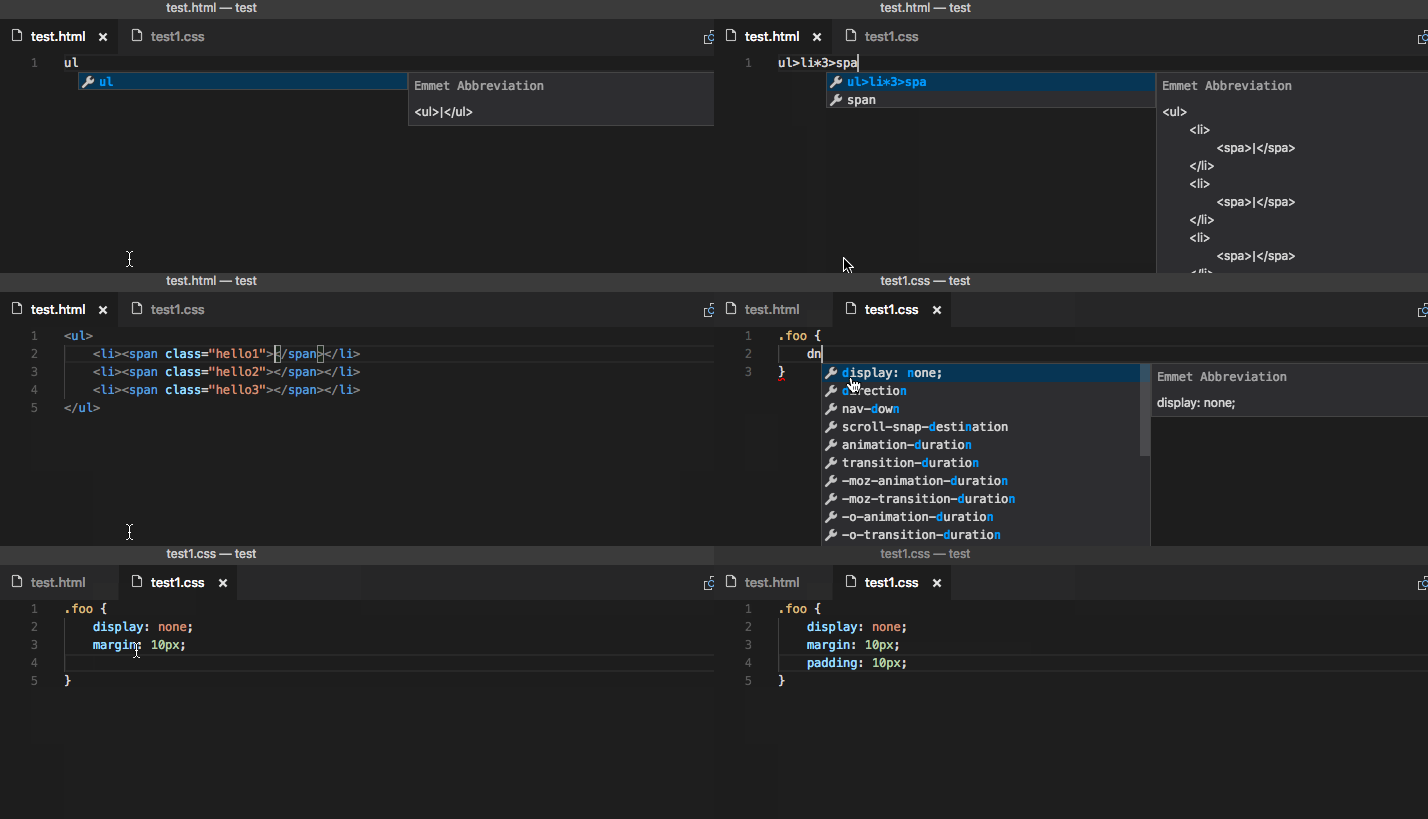
Emmet is a shortcut language for writing HTML.
You type a short abbreviation, press Tab, and the editor expands it into full HTML.
Think of Emmet like:
Autocomplete on steroids for HTML ⚡
Why Emmet Is Useful for HTML Beginners
For beginners, Emmet helps you:
Write HTML faster
Avoid forgetting closing tags
Focus on structure, not typing
Learn correct nesting naturally
👉 You still need to understand HTML.
Emmet just removes the typing pain.
How Emmet Works in Code Editors
Emmet is built into most modern editors.
Best choice (recommended):
- VS Code ✅ (Emmet works out of the box)
How it works:
Type an Emmet abbreviation
Press Tab (or Enter)
HTML is generated instantly
Basic Emmet Syntax (The Core Idea)
Emmet uses symbols to describe structure.
| Symbol | Meaning |
> | Child |
+ | Sibling |
* | Repeat |
. | Class |
# | ID |
[] | Attributes |
Don’t memorize — we’ll use them naturally.
Creating HTML Elements with Emmet
Example 1: Single Element
Emmet
p
⬇ Press Tab
<p></p>
Example 2: Heading
Emmet
h1
⬇
<h1></h1>
Tag vs Expanded HTML (Visual Idea)

Adding Classes, IDs, and Attributes
Class
Emmet
div.container
<div class="container"></div>
ID
Emmet
section#main
<section id="main"></section>
Attributes
Emmet
img[src=photo.jpg alt=profile]
<img src="photo.jpg" alt="profile">
Creating Nested Elements
This is where Emmet shines ✨
Example
Emmet
div>h1+p
<div>
  <h1></h1>
  <p></p>
</div>
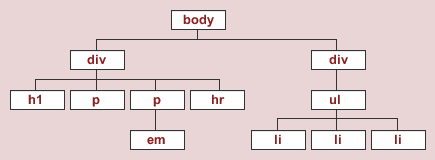
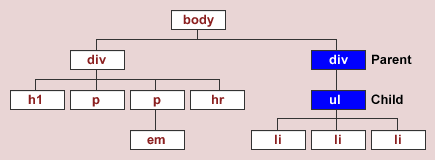
> means inside.
Nested Structure (Visual)
Repeating Elements Using Multiplication
Example: List Items
Emmet
li*3
<li></li>
<li></li>
<li></li>
Example: Full List
Emmet
ul>li*3
<ul>
  <li></li>
  <li></li>
  <li></li>
</ul>
Combining Everything (Realistic Example)
Emmet
div.card>h2+p*2
<div class="card">
  <h2></h2>
  <p></p>
  <p></p>
</div>
This is daily-use Emmet.
Generating Full HTML Boilerplate
This one feels like magic 🪄
Emmet
!
or
html:5
⬇
<!DOCTYPE html>
<html lang="en">
<head>
  <meta charset="UTF-8">
  <title>Document</title>
</head>
<body>

</body>
</html>
Perfect starting point every time.
Emmet Is Optional — But Powerful
Important reminder for beginners 👇
You can write HTML without Emmet
Emmet does not replace HTML
Emmet just makes you faster and cleaner
Learn HTML first.
Use Emmet to speed up practice.
Best Way to Learn Emmet
✅ Open VS Code
✅ Create an .html file
✅ Try each abbreviation yourself
✅ Expand → Read → Understand
That’s it.
One-Line Mental Model
Emmet lets you describe HTML structure in one line instead of typing many.


